Hello, newbie here with lights. I found the photon app and love the simplicity. I have been able to program some simple par lights but I’m having a hard time with a Shehds 230W mini beam as it is not on the list of devices. I went in and created a profile for the light but I’m having a tuff time with getting the colors programmed. Any help would be amazing, thanks in advance.
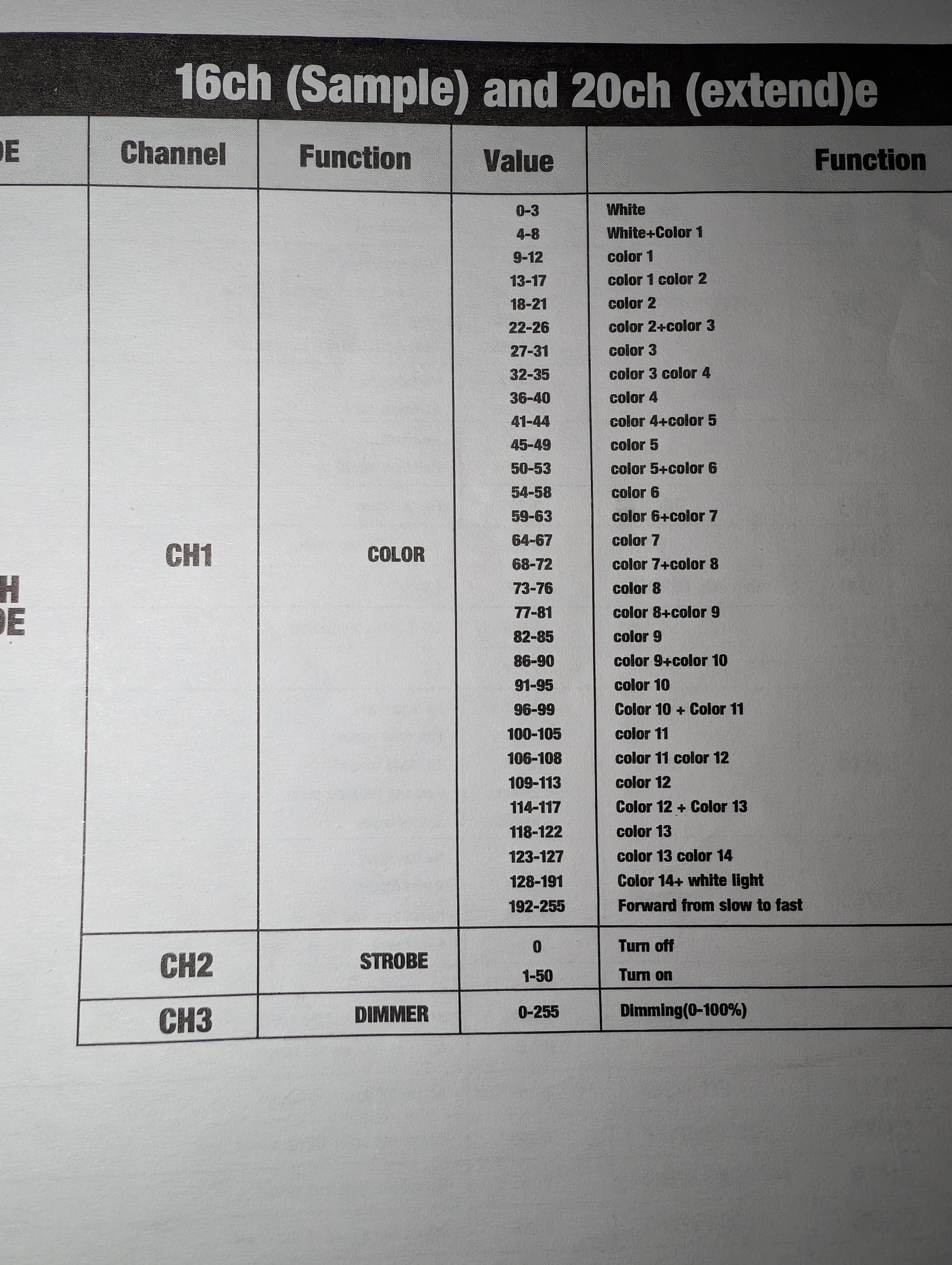
Hi and welcome !
You can configure your fixture like that
In Photon:
- Go to Devices and select Create a fixture (by myself). You can follow this guide: Photon Fixture Creation Guide.
- Add channels according to the DMX chart of your light (e.g., Channel 1 = Pan, Channel 2 = Tilt, Channel 3 = Color, etc.).
- For color: if your fixture uses a discontinuous color wheel, set that channel type to “Color Wheel” and enter the value ranges manually (e.g., 0–15 = White, 16–31 = Red, etc.).
Do the same for the dimmer dans the strobe
Once your fixture profile is saved:
- Add it to the DMX mapping.
- Then add the fixture to a group so you can control it easily during your show.
I think you already did it, but what is your problem ?
I toyed with the ‘Color Wheel’ setup ( I think you mean Gobos color mode) and found that it was mapped to the color spectrum in the device control. I did not see a way to select a range of values for that color, just one color value. Any insight as to how colors in between the set colors are calculated?
Good question! In fixtures like this, the color selection works through a gobo color wheel, basically physical color filters (like gels) placed in front of the lamp or LED. That means each position on the wheel corresponds to a fixed color, such as red, green, or a split color like red+green.
Because of this physical mechanism, the fixture can’t produce an infinite range of in‑between colors, it can only show the colors available on the wheel. To achieve smooth color mixing, you’d need a fixture that uses RGB or LED color mixing rather than gobos.
So in Photon, there’s no need to map a DMX range for that channel, a single DMX value per color is enough since a range wouldn’t give any extra result.
However, if you want to experiment and build manual control, you could create custom properties in Photon with separate sliders for each color channel instead of using the predefined color wheel buttons.
I hope I answered to your question !
I do understand how gobo fixtures work, it just threw me off when you referenced ranges where no ranges were available. I had been setting them up with a slider channel for the gobo color selection. I see that the advantage to using the ‘Gobos color mode’ is a visual representation within the Light Control rather than relying on numbers in the custom controls. I do see as I observe individual channel values that those values jump instantly to one of the defined values, based on proximity, and there is never any approximation or interpolation of channel values when one is in between defined colors.
When you are setting up the fixture and choosing a color in ‘Gobos Color’ mode you are presented with a full spectrum to choose a color. It would be nice if the six common colors were available as spot colors.
Obviously there can be no smooth transitions between colors, but I can see this feature coming in handy.
You’re right, and sorry about that, I was totally off base with my previous answer. I understand much better now what you’re describing.
Regarding the configuration, I think that’s a great idea. It would also be really useful to display the actual available gobos directly within the group control spectrum, so you can see at a glance what’s really available on the fixture and select them quickly without having to guess what color could be selected.