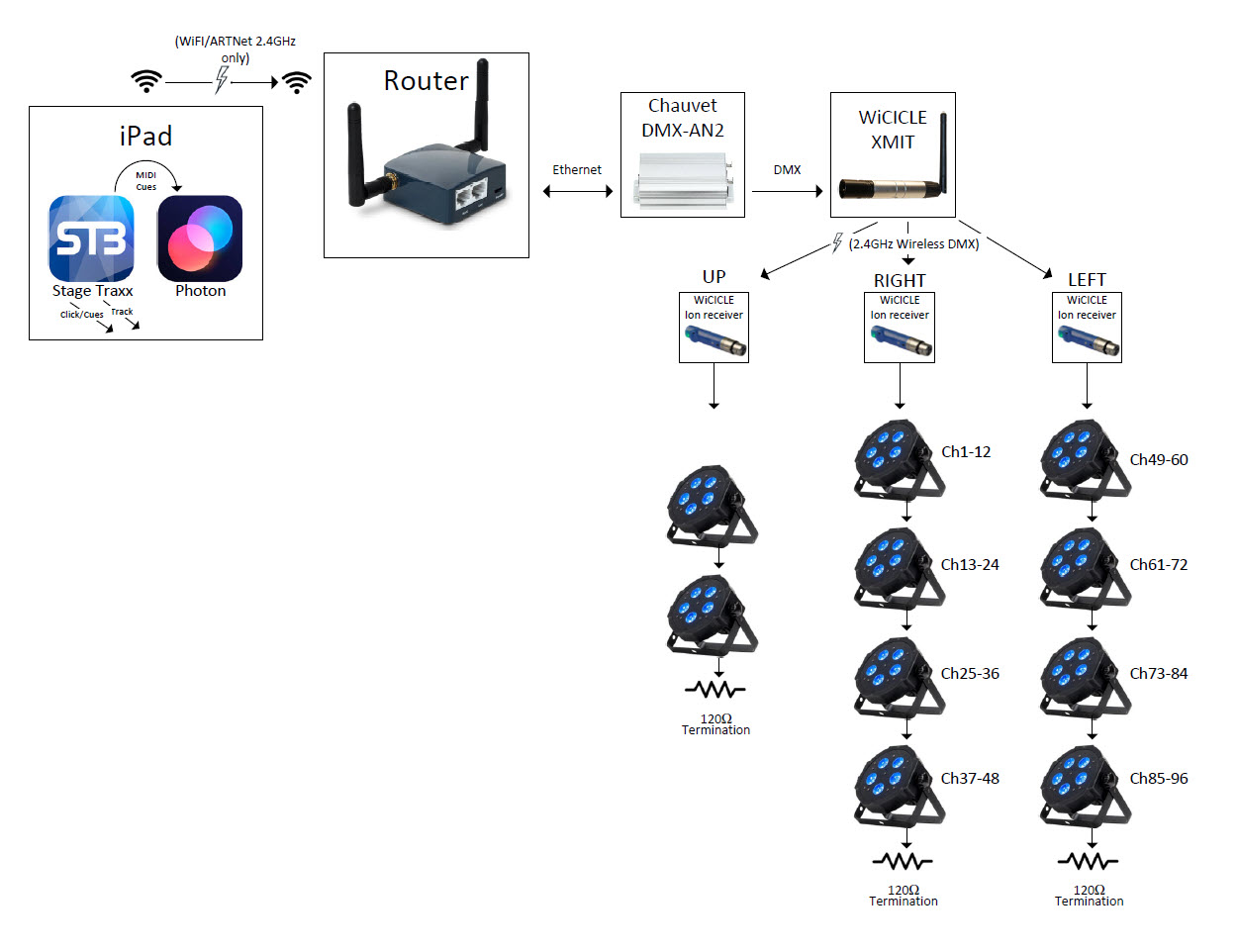
Hi all, testing my setup. I have a chauvet DMX-AN2 (which is a ethernet → DMX box) set up on a private network with a wireless access point. My iPad is on this wireless network and I’m running a scene in photon 2.
The DMXAN2 uses 2.0.0.1 as its IP address and is expecting ArtNet data, as I’ve configured it. I’m not seeing and DMX signaling out of the chauvet whatsoever.
How can i verify that photon 2 is sending the data properly?
Thanks
FWIW, here is a block diagram of my setup. Currently, the fixtures and Wicilce WDMX Tx and Rx are not connected. (So it stops at the Chauvet DMX-AN2)
I’m just trying to make sure I can get DMX through the first bit of it before I worry about wireless DMX. Worst case I have to wire up the fixtures at every gig.
I’m probing with an oscilloscope on the DMX output of the chauvet, and I can’t see any signal coming out of either XLR connector whatsoever. I just see a flat 5V DC on pin 3 and 0V on pin 2., no signal at all. I was under the impression that DMX was constantly transmitting, whether or not he signal contained any lighting information? Is that not correct?
If not, I’m wondering if I have Photon set up wrong. I’m on the correct wifi network, iPad IP is 192.168.8.210, subnet at universe are both 0. Chauvet IP is fixed at 2.0.0.1, subnet is 255.0.0.0 (I think this is the same as photon?). Port A on the Chauvet is universe 0, which is where I’m probing. Both Photon and Chauvet are set to ArtNet.
Any ideas what I’m doing wrong?
Well, figured it out, and i’ll report back here for anyone else searching this: the iPad MUST be set to use an IP address of 2.x.x.x, whether it’s being used over Wifi, or directly connected to the AN2 via usb-C to ethernet adapter.
The AN2 manual sort of implies you only need to use this host addres if you’re trying to access the AN2 webpage, but it seems you also have to set the 2.x.x.x if you want to get the AN2 outputting DMX info period.
The DMX box must be in the same network as the iPad.
My WiFi access point issues DHCP adrress to the iPad but the An2-DMX adapter does not quirky DHCP So you set it manually to have an address in the network that the WiFi access points DHCP is using.
You can do this
By connecting the iPad to the An2-DMX box via an Ethernet hub - set the iPad address initially manually to the default address 2.x.x.1 and browse to the an2 default address - change the an2 address to be in your usual network say 192.168.10.10 and save.
Then reconnect the iPad to WiFi and let it get a dhcp address - connect the an2 to the access point with a cable - Photon will see the an2